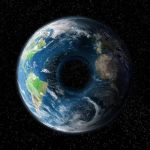
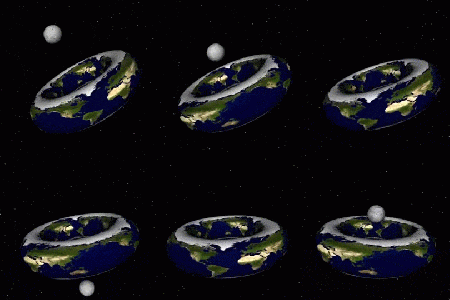
According to the laws of physics, a planet in the shape of a doughnut (toroid) could exist Physicists say that such a planet would have very short nights and days, and arid outer equator, twilight polar regions, moons in strange orbits and regions with different gravity and seasons.
Actually, I’m reblogging this again. Because I just wanted to say this is a brilliant thing to potentially add to a story at some point and I want to tag this so I can find it later.
so metropolitan museum of art has a register of books they’ve published that are out of print and that you can download for free! they’re mostly books on art, archeology, architecture, fashion and history and i just think that’s super useful and interesting so i wanted to share! you can find all of the books available here!
I’ve been getting quite a few asks about the process for the patterns in my stylized artworks, so I decided to put together a couple of tips regarding them.
Firstly, what you need are
— CUSTOM BRUSHES —
Most of the patterns I use are custom brushes I made, such as those:
For the longest time I was convinced making brushes must be super extra complicated. I was super extra wrong. All you need to start is a transparent canvas (2500px x 2500px max):
This will be your brush tip. When you’re satisfied how it looks, click Ctrl+A to select the whole canvas and go to ‘define brush preset’ under the edit menu
You will be asked to name your new glorious creation. Choose something that describes it well, so you can easily find it between all the ‘asfsfgdgd’ brushes you’ve created to be only used once
This is it. Look at it, you have just created a photoshop brush. First time i did I felt like I was cheated my whole life. IT’S SO EASY WHY HASN’T ANYONE TOLD ME
Time to edit the Good Boi to be more random, so it can be used as a Cool Fancy Pattern. Go into brush settings and change whatever you’d like. Here’s a list of what I do for patterns:
– under Shape Dynamics, I increase Size Jitter and Angle jitter by 5%-15%
– under Brush Tip Shape, I increase spacing by a shitload. Sometimes it’s like 150%, the point is to get the initial brush tip we painted to be visible.
– If I want it to look random and noisy, I enable the Dual Brush option, which acts like another brush was put on top of the one we’ve created. You can adjust all of the Dual Brush options (Size, Spacing, Scatter, Count) as you wish to get a very nice random brush to smear on your backgrounds
The result is as above. You can follow the same steps to create whatever brush you need: evenly spaced dots that look like you painted them by hand, geometric pattern to fill the background, a line of perfectly drawn XDs and so on.
BUT WAIT, THERE’S MORE
— PATHS —
But what if you want to get lots of circles made of tiny dots? Or you need rows of triangles for your cool background? Photoshop can do all of that for you, thanks to the magic of paths.
Typically, paths window can be found right next to Layers:
Draw whatever path you want, the Shape Tool has quite a bit of options. Remember, paths are completely different from brush strokes and they won’t show up in the navigator. To move a path around, click A to enable path selection tool. You can use Ctrl+T to transform it, and if you move a path while pressing Alt it will be duplicated.
Now, pick a brush you wish really was in place of that path you’ve drawn and go to layers, then choose the layer you want it to be drawn on. Then, click this tiny circle under the Paths window:
Then witness the magic of photoshop doing the drawing for you while you wonder how tf have you managed to forget about this option for the past 2 years
You can combine special brushes and paths for all sorts of cool effects. I mostly use them in backgrounds for my cards, but you can do whatever you want with them.
I hope that answers the questions for all of the people who were sending me inquires about the patterns. If you have any questions regarding this or any other Photoshop matter feel free to message me, I’m always up for complaining about how great and terrible Photoshop is C’:
OKAY SO realtalk i haven’t actually used feedly in a long time, it’s just the most newbie-friendly and has a decent ‘tumblr-esque’ interface for someone used to scrolling a dash
so i was totally unawares that, for the most part, you could just paste channel and blog links straight into the rss reader and have it pick up the feed and give you updates, without you having to figure out where the feed is hiding
so just take a minute to make an account, paste some tumblr/dreamwidth/mastodon/artstation/youtube urls in there, and go nuts
i’m just gonna post all the ways i’ve found so far to get RSS Links They Don’t Want You To Know About from social media sites, because people keep Leaving Tumblr Forever in favor of sites that i’m not going to use
(if you don’t have an rss reader yet just make a feedly account, it takes about one whole minute, if you decide to use a different reader later you can export your whole list, it’s fine)
i’m gonna use strikethrough to indicate the text you need to replace and also include examples of feeds that seem to work
A General Rule
on almost any website look for the icon that looks like this
that’s the button that means ‘the rss feed is here’
Tumblr
just add /rss to the end of literally any blog’s url, including tags
i.e. unpretty.tumblr.com/rss or unpretty.tumblr.com/tagged/original/rss
now you can Leave Tumblr Forever and still follow blogs until such a time as tumblr implodes in earnest
Dreamwidth
use username.dreamwidth.org/data/rss
i.e. gallusrostromegalus.dreamwidth.org/data/rss
WordPress
if it’s hosted on WordPress.com, just add /feed to the end of the url
if it’s self-hosted (i think around 20% of people who have their own website use wordpress to host it, i know i do bc it’s easy as sin) also just add /feed to the end the url
i.e. en.blog.wordpress.com/feed or kittyunpretty.com/feed
ArtStation
use username.artstation.com/rss
i.e. beccahallstedt.artstation.com/rss
Mastodon
just add .rss to the end of someone’s profile url
i.e. cybre.space/@kittyunpretty.rss
deviantART
use backend.deviantart.com/rss.xml?q=gallery%3Ausername
i.e. backend.deviantart.com/rss.xml?q=gallery%3Aarvalis
YouTube
this one’sa goddamn pain in the dick because you need to find the channel id first
in general youtube channels have a nonsense url like youtube.com/channel/abunchofbullshit
you have to take that last bit and plug it into youtube.com/feeds/videos.xml?channel_id=abunchofbullshit
i.e. youtube.com/feeds/videos.xml?channel_id=UCbpMy0Fg74eXXkvxJrtEn3w
Tapas
this is mostly handy for webcomics that were hosting on tumblr and crossposting, i think? i don’t know how tapas works for creators tbqh. anyway they’ve actually got a button at the top when you go to the comic page.
the one between ‘add to library’ and the paper airplane will give you the rss feed
LINE Webtoons
ditto wrt tumblr-hosted webcomics, and also having a button
the button to the left of the one that says +subscribe will get you the rss feed
Twitter & Instagram
these are the only two sites i’m including that don’t have native rss support, just because so goddamn many people have literally no other web presence at all for some reason
twitter used to have rss feeds but killed them, and i don’t think instagram ever had them. you have to use workarounds for these, and a lot of them end up getting killed, like TwitRSS.me. fetchrss seems to work okay but it costs money. if you pay for inoreader they’ve got built-in support for following twitter accounts but that’s not a practical solution for most people.
right now i use rsshub.app/platform/user/username
i.e. rsshub.app/twitter/user/dasharez0ne
… but the instagram one doesn’t actually seem to work, like, most of the time. i don’t know if i’ve found one that works ever. if you’re jumping ship there please consider doing the world the enormous goddamn favor of just making a free wordpress.com account and cross-posting all your instas with ifttt or something, rather than being totally at the mercy of mark zuckerberg
How much longer until the utopic Solarpunk future where Capitalism is dead and we all live in ecologically sustainable high-tech forest cities? Asking for a friend.
Until we make those ecologically sustainable high-tech forest cities ourselves. It’s going to take a lot of us to do it though, so best to spread the word (and gather native tree seeds).
And, like, get started now. Then our “weirdo houses” will be the only thing functioning when everything falls apart!
The only reason why we don’t live in a solarpunk world right now is because no one has bothered to make it yet.
We’ll have to make it ourselves, and we’ll have to help each other make it. That’s why it is solarpunk.
Some resources to consider creating or joining or doing:
Repair cafes – create or join your local repair cafe! Repair stuff, learn how to repair stuff, teach others how to repair stuff.
Map of Makerspaces – make some things! learn how to make some things! teach others how to make some things!
Community Garden Map (note that this is US-only, and not a complete list) – join a local community garden
Learn some basics on passive solar design – clever use of the sun can create extremely energy efficient homes and buildings. You can use these principles to save on energy bills, even if you’re renting.
Free USDA Complete Guide to Home Canning, 2015 revision – cut down on personal food waste! Learn how to safely preserve food. Very useful if you suddenly harvest / purchase for crazy cheap in season / dumpster dive a ton of perishable food.
Donate to One Acre Fund, which provides training and capital to farmers (making them more productive and pulling them out of poverty) in various east African countries
Donate to Bridges to Prosperity, which provides technical expertise, money, and volunteers, to help local people build and maintain their own footbridges in extremely isolated rural areas
joining r/solarpunk, and sharing links/ideas/art/music with the community. Also, upvoting stuff for greater visibility. There’s over 900 members!





















 Creator's Archive