This website was literally so fucking stupid. You used to be able to just fucking edit somebody’s post. Like just change it entirely. Nothing was stopping you. What the fuck. Imagine logging into your youtub account and some bozo changed your funny comment to say you love being a dummy. That’s what used to happen here. Every single day.
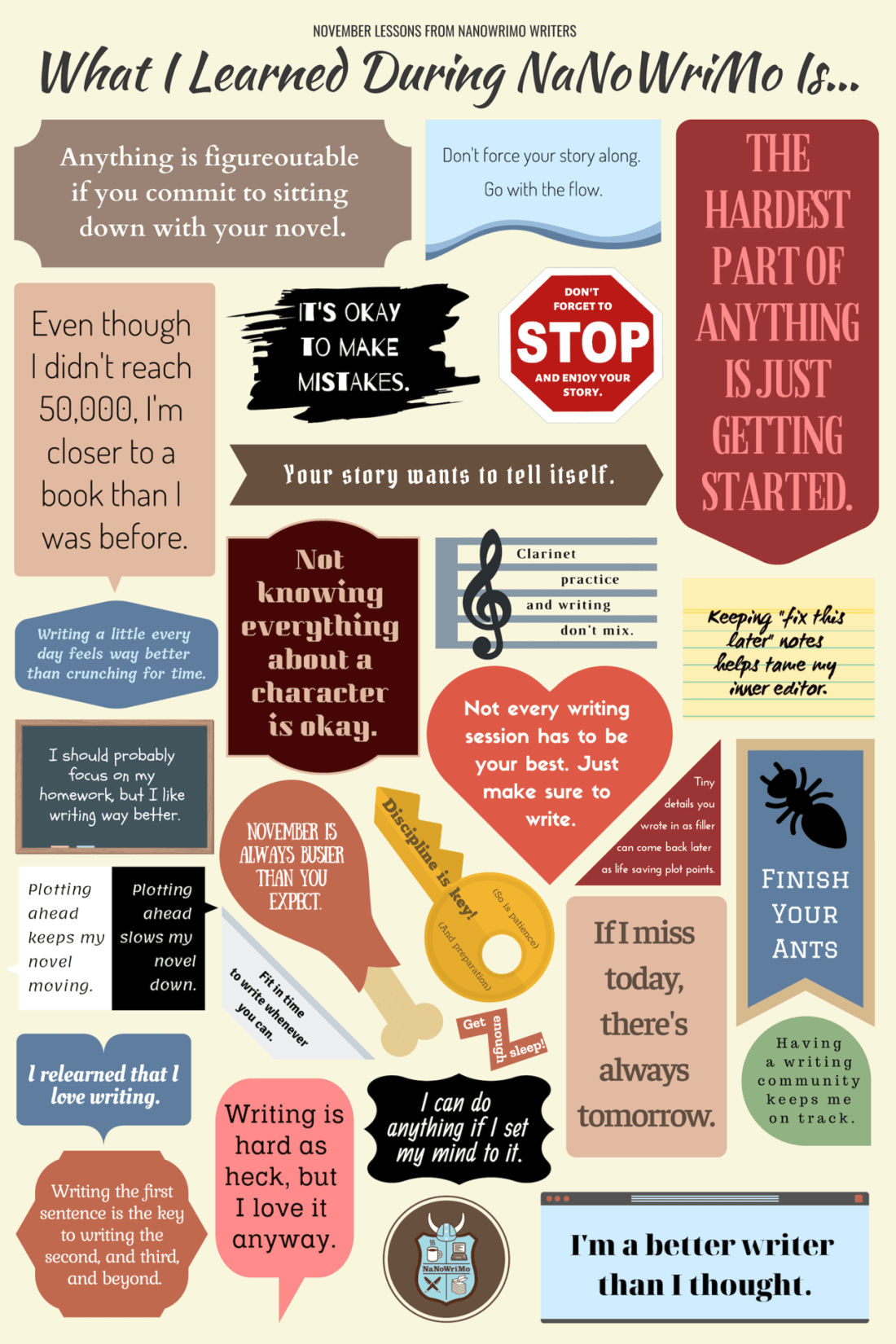
NaNoWriMo 2018 may be over, but we’re still thinking about what we’ve learned along the way.
During last week’s Virtual Write-In, we asked NaNo participants about the lessons they’ve learned over the course of November—about writing, community, and themselves—and compiled them into a handy infographic for you.
*slams back a bourbon whiskey* listen mate I’ve been here for all kinds of ridiculous tumblr meltdowns I was here when Yahoo took over I was here for dashcon I was here when the notes disappeared I was here back when those superwholock chain posts of fucking up non believers were taken seriously and through every single one I have done fuck all. I have not changed a goddang thing. I waited for the end and the end never came. I do not plan on changing my status quo now. either things will go on as they always have and in six months time I’ll be here watching staff announce that anyone with over 1000 followers are being monitored or I will have been physically deleted from this wonderful stupid fucking website and either way I’m gonna go out posting pictures of my cat
OKAY SO realtalk i haven’t actually used feedly in a long time, it’s just the most newbie-friendly and has a decent ‘tumblr-esque’ interface for someone used to scrolling a dash
so i was totally unawares that, for the most part, you could just paste channel and blog links straight into the rss reader and have it pick up the feed and give you updates, without you having to figure out where the feed is hiding
so just take a minute to make an account, paste some tumblr/dreamwidth/mastodon/artstation/youtube urls in there, and go nuts
the other thing im confused about is tumblr says theyll only remove blogs that “repeatedly post senstiive content” after december 17th. but like what are the exact rules on that? is it like a 3 strike system? does it count all the times you have to appeal a post?
what if youre still waiting for them to review a post? do they ban you anyway?
what if previous posts you appealed were proven to be totally innocent? do they still ban you?
like if a blog posting pictures of kirby has to keep appealing posts do they get banned just cuz the bot keeps saying theyre posting sensitive content even though they arent?
i’m just gonna post all the ways i’ve found so far to get RSS Links They Don’t Want You To Know About from social media sites, because people keep Leaving Tumblr Forever in favor of sites that i’m not going to use
(if you don’t have an rss reader yet just make a feedly account, it takes about one whole minute, if you decide to use a different reader later you can export your whole list, it’s fine)
i’m gonna use strikethrough to indicate the text you need to replace and also include examples of feeds that seem to work
A General Rule
on almost any website look for the icon that looks like this
that’s the button that means ‘the rss feed is here’
Tumblr
just add /rss to the end of literally any blog’s url, including tags
i.e. unpretty.tumblr.com/rss or unpretty.tumblr.com/tagged/original/rss
now you can Leave Tumblr Forever and still follow blogs until such a time as tumblr implodes in earnest
Dreamwidth
use username.dreamwidth.org/data/rss
i.e. gallusrostromegalus.dreamwidth.org/data/rss
WordPress
if it’s hosted on WordPress.com, just add /feed to the end of the url
if it’s self-hosted (i think around 20% of people who have their own website use wordpress to host it, i know i do bc it’s easy as sin) also just add /feed to the end the url
i.e. en.blog.wordpress.com/feed or kittyunpretty.com/feed
ArtStation
use username.artstation.com/rss
i.e. beccahallstedt.artstation.com/rss
Mastodon
just add .rss to the end of someone’s profile url
i.e. cybre.space/@kittyunpretty.rss
deviantART
use backend.deviantart.com/rss.xml?q=gallery%3Ausername
i.e. backend.deviantart.com/rss.xml?q=gallery%3Aarvalis
YouTube
this one’sa goddamn pain in the dick because you need to find the channel id first
in general youtube channels have a nonsense url like youtube.com/channel/abunchofbullshit
you have to take that last bit and plug it into youtube.com/feeds/videos.xml?channel_id=abunchofbullshit
i.e. youtube.com/feeds/videos.xml?channel_id=UCbpMy0Fg74eXXkvxJrtEn3w
Tapas
this is mostly handy for webcomics that were hosting on tumblr and crossposting, i think? i don’t know how tapas works for creators tbqh. anyway they’ve actually got a button at the top when you go to the comic page.
the one between ‘add to library’ and the paper airplane will give you the rss feed
LINE Webtoons
ditto wrt tumblr-hosted webcomics, and also having a button
the button to the left of the one that says +subscribe will get you the rss feed
Twitter & Instagram
these are the only two sites i’m including that don’t have native rss support, just because so goddamn many people have literally no other web presence at all for some reason
twitter used to have rss feeds but killed them, and i don’t think instagram ever had them. you have to use workarounds for these, and a lot of them end up getting killed, like TwitRSS.me. fetchrss seems to work okay but it costs money. if you pay for inoreader they’ve got built-in support for following twitter accounts but that’s not a practical solution for most people.
right now i use rsshub.app/platform/user/username
i.e. rsshub.app/twitter/user/dasharez0ne
… but the instagram one doesn’t actually seem to work, like, most of the time. i don’t know if i’ve found one that works ever. if you’re jumping ship there please consider doing the world the enormous goddamn favor of just making a free wordpress.com account and cross-posting all your instas with ifttt or something, rather than being totally at the mercy of mark zuckerberg








 Creator's Archive